




1. Register for your Course
Before you start your programme, you will be sent a registration email inviting you to register for your programme with instructions on how to complete your registration online.
2. MFA
All Microsoft Office 365 accounts are protected with MFA. This means you cannot access your account with just a password. On your first login to office 365, you will be required to register for MFA. Note, this can only be done if you have a computer or laptop and a smartphone, it cannot be done on a smartphone alone, you will need to watch the video which fully explains how to register for MFA.
3. Paying your fees
It is important to consider how you will fund your studies. Whilst some students will be self-funded others will be funded by their employer, Skillnet, ReShape or Springboard+. You should take the time to consider your funding options and learn about the payment deadlines and fee policies at TUS.
Self-Funded Payment Options
To help make payments more manageable for students who are self-funding, TUS has a variety of payment options that include payment per semester, in-full or by instalment.
Self-funded students can choose from one of the following payment plans.
Flexible payment plans for Self-Funded Students
| Payment Plan 1 | Payment Plan 2 | Payment Plan 3 |
| September Intake | September Intake | September Intake |
| √ 100% Payment at Registration | √ 50% by 14th September | √ 20% at registration |
| √ 50% by 11th January | √ 10% per month for 8 months |
Springboard+ contributions must be paid in full before course commencement in line with the fee schedule.
For more information on payment options and payment deadlines, See our Fee Schedule.
Fees for Employer Funded / Sponsored students
If you are funded by your employer or a sponsor, please email flexiblelearning.midlands@tus.ie for further details on how to proceed.
Letter of registration/payment can be found in student apps on the landing page on Banner self-service and select online receipt from the menu.
4. Accessing and Understanding your Timetable
Click Here to View Your Timetable
Click Here to view our video guidance
Click Here to read our guide on Viewing your Student Timetable
5. Academic Calendar
Student Academic Calendar 2026/2027
| Calendar Week | Teaching Week | Timetable System Week | Important Dates |
|---|---|---|---|
| Semester 1 | |||
| 07-Sept | Timetable Week 4 | Online Induction: Saturday 12th September | |
| 14-Sept | Teaching Week 1 | Timetable Week 5 | Teaching commences for all DoLL Programmes |
| 21-Sept | Teaching Week 2 | Timetable Week 6 | |
| 28-Sept | Teaching Week 3 | Timetable Week 7 | Saturday Classes 3rd October (online) |
| 05-Oct | Teaching Week 4 | Timetable Week 8 | |
| 12-Oct | Teaching Week 5 | Timetable Week 9 | |
| 19-Oct | Teaching Week 6 | Timetable Week 10 | |
| 26-Oct | Reading Week | Timetable Week 11 | Reading Week (no classes) |
| 02-Nov | Teaching Week 7 | Timetable Week 12 | |
| 09-Nov | Teaching Week 8 | Timetable Week 13 | Saturday Classes 14th November (online) |
| 16-Nov | Teaching Week 9 | Timetable Week 14 | Semester 1 Exam Timetable to issue on the 16th November |
| 23-Nov | Teaching Week 10 | Timetable Week 15 | |
| 30-Nov | Teaching Week 11 | Timetable Week 16 | Final Teaching Week |
| 07-Dec | Semester 1 Exam Week | Timetable Week 17 | Examination Week |
| 14-Dec | Semester 1 Exam Week | Timetable Week 18 | Examination Week |
| 21-Dec | Academic Break | Timetable Week 19 | Semester Break |
| 28-Dec | Academic Break | Timetable Week 20 | Semester Break |
| Semester 2 | |||
| 04-Jan | Timetable Week 21 | Semester Break | |
| 11-Jan | Teaching Week 1 | Timetable Week 22 | Teaching commences |
| 18-Jan | Teaching Week 2 | Timetable Week 23 | |
| 25-Jan | Teaching Week 3 | Timetable Week 24 | |
| 01-Feb | Teaching Week 4 | Timetable Week 25 | Public Holiday Monday, 2nd February (St. Brigid’s Day)Semester 1 Exam Results released Thursday, 4th FebruarySaturday Classes 6th February (online) |
| 08-Feb | Teaching Week 5 | Timetable Week 26 | |
| 15-Feb | Reading Week | Timetable Week 27 | Reading Week (no classes) |
| 22-Feb | Teaching Week 6 | Timetable Week 28 | |
| 01-Mar | Teaching Week 7 | Timetable Week 29 | |
| 08-Mar | Teaching Week 8 | Timetable Week 30 | |
| 15-Mar | Teaching Week 9 | Timetable Week 31 | Public Holiday Wednesday, 17th March (St. Patrick’s Day) |
| 22-Mar | Easter Break | Timetable Week 32 | Semester BreakSemester 2 Exam Timetable to issue on the 23rd March |
| 29-Mar | Easter Break | Timetable Week 33 | Semester Break |
| 05-Apr | Teaching Week 10 | Timetable Week 34 | Saturday Classes 10th April (online) |
| 12-Apr | Teaching Week 11 | Timetable Week 35 | |
| 19-Apr | Teaching Week 12 | Timetable Week 36 | Final Teaching Week |
| 26-Apr | Semester 2 Examinations | Examination week | |
| 03-May | Semester 2 Examinations | Public Holiday – Monday, 3rd MayExamination week | |
| 10-May | |||
| 17-May | |||
| 24-May | |||
| 31-May | |||
| 07-Jun | Exam Results Release Date Thursday 10th June |
6. Accessing Moodle via Microsoft 365
1. The Moodle App can be found via the TUS Microsoft 365 Apps page.
2. Scroll down the page to locate the Moodle icon.
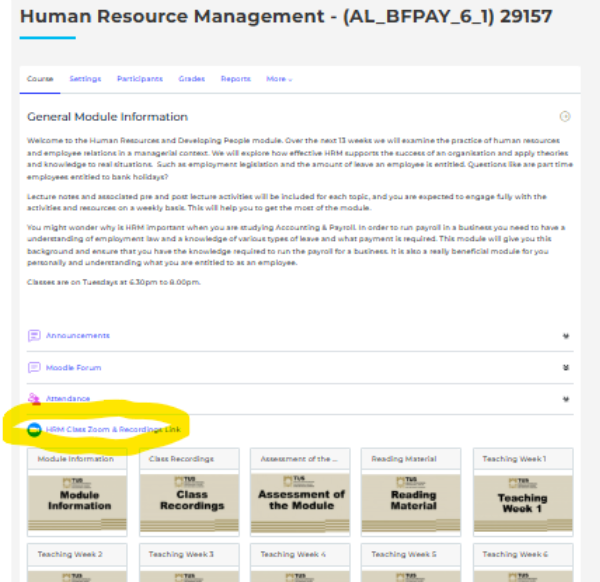
3. Once you have clicked on the Moodle icon, it will open to your personal Dashboard.

4. Scroll to the Course Overview section of the Dashboard page.
This will be populated with all of your modules for the academic year – generally three for Semester 1 and three for Semester 2
5. To access a particular module, click on the tile. e.g.

7. Accessing your live Zoom classroom and recordings via Moodle
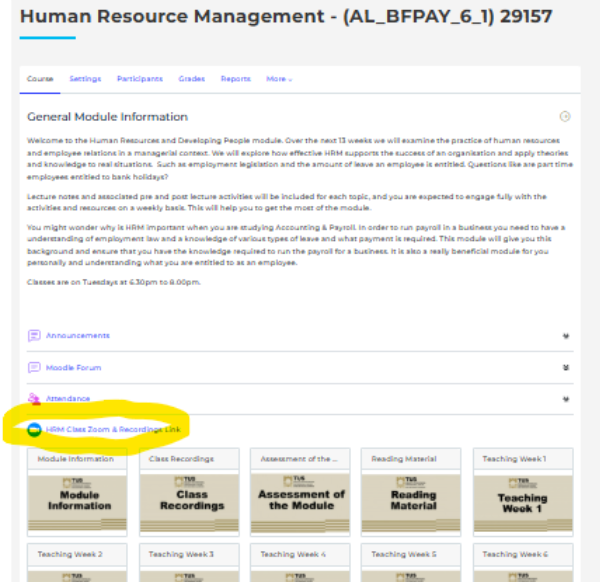
1. To access your live classroom, click on the link, as highlighted below
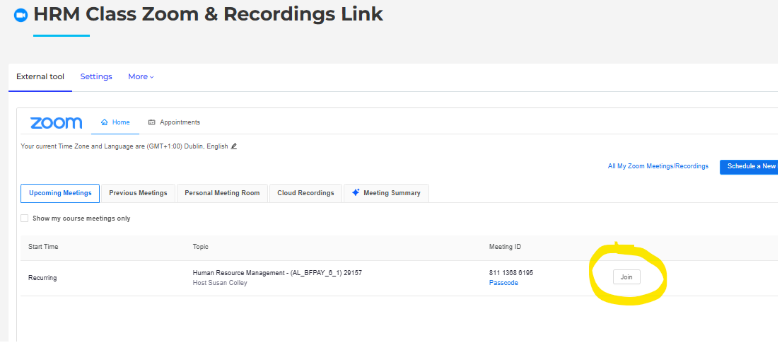
2. To access your recorded classes:
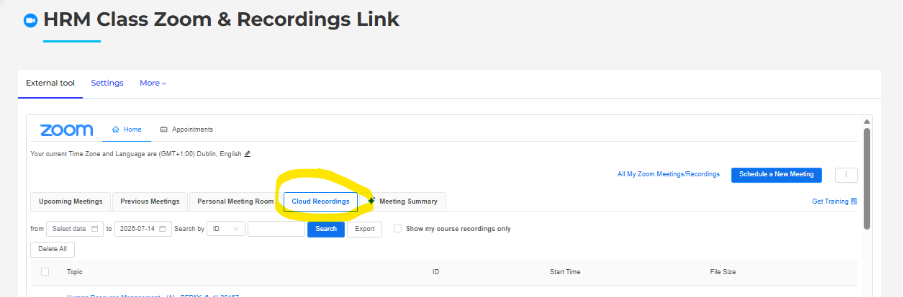
3. To access the recordings from previous classes:
8. Student Supports

Our student advisor, Elaine Burke, is here to support you during your time with the Lifelong Learning Department at TUS.
There will be workshops on Academic Writing, Library support etc. throughout the year.
Elaine will connect students with campus services and resources, offer support for personal and academic challenges, and help develop strategies for success.
Please reach out if you have any queries or issues.
Email: flexibleadvisor.midlands@tus.ie
Phone Number: 090 647 1825
9. Access to Library Services
Whether you’re looking to borrow books, access digital resources, use Libary facilities, or attend an event, you’ll find all the essential information to begin your journey right here.
10. Student ID Cards
Applications for student cards will open at the end of September 2026. A link will be sent to all registered students at this time.
Only students registered on programmes leading to Academic Awards and Professional Awards will be issued with a student card. You will be required to have a current student card for the online examination process.
11. Examinations
All online open book examinations will be scheduled as per the examinations timetable which will be published 4 weeks in advance of the examination period.
Assigned Examination Week Semester 1: W/C 7th December 2026, W/C 14th December 2026
Assignment Examination Week Semester 2: W/C 26th April 2026, W/C 3rd May 2026
12. Graduation
Graduation takes place each year for the Major Awards at the end of October/start of November.
Full details of graduation ceremonies, dates and times will be posted on the conferring ceremonies page closer to the time. https://tus.ie/conferring/athlone/
13. Contact Information
| Department of Lifelong Learning | Email: flexiblelearning.midlands@tus.ie |
| Phone: 090-648-3050 | |
| Funded Learning Office (Springboard+/SUSI) | Email (Springboard+ Queries): springboard.midlands@tus.ie |
| Student Advisor | flexibleadvisor.midlands@tus.ie |
14. Online Induction
Dr Michael Tobin (michael.tobin@tus.ie) is inviting you to a scheduled Zoom meeting.
An introduction to TUS, the Faculty of Continuing, Professional, Online and Distance learning, The Department of Lifelong Learning and the team. This morning is very important and sets the foundation for a learners success through advising learners on how to access their weekly lectures, their virtual learning environment – Moodle including discussions on assessments, academic calendar and students supports.
Topic: 26/27 Online Student Induction
Time: Saturday 12th September at 9.30am
Join Zoom Meeting
https://tus-ie.zoom.us/j/9398435349?pwd=ajfrP1TTfVR43kOx9Op6hFRu43EA2s.1&omn=83141535287#success
Meeting ID: 939 843 5349
Passcode: July2026